Saturday, 5 March 2011

Calling the roll + Target Language

I don't always call the roll at the start of the lesson for some of my classes, as by mid-way through the lesson I usually know who is there and who isn't. We complete our rolls electronically and so when there's an opportunity during a lesson, I complete it then - either on the school laptop or on my iPod Touch as I wander around. However, I do call out the roll for my new Year 7 classes at the start of the lesson as I don't yet know them so well. 

Over the past couple of weeks we have been learning numbers and so rather than have the students call out 'Hai Sensei' (as in "Yes Teacher"), I had them call out their favourite number in Japanese. This has worked really well and so from next week I plan to do this for Year 8, who have been learning the subjects in French. They will be asked to call out their favourite subject in French.

So next time you are calling the roll in your language class, pick a topic for the week and have them call out a word from their vocab list in the 'Target Language'. You could do it sequentially for something like numbers or you could place limits on the number of times a particular word is called out. Please share your ideas in the comments.


Sunday, 31 October 2010

Posterous + iPod apps

Recently I've been playing around with apps on my new iPod Touch, enjoying the camera, video and audio recording functions that my previous Gen1 iPod Touch were lacking.

Over the past year or so I have been using Posterous to post reading exercises and student work for an increasing number of classes. It is simple to use and the fact that you can email posts straight to the web makes it great for creating things on the iPod before emailing it up to the class site. The amazing array of apps available for the iPod meaning you can add bells and whistles to your reading passage.

The following are some of the apps I have so far found useful. I use the free version of most of them though they do have paid versions with extra features that I may soon upgrade to.

I have more and more students appearing in class with iPod touches or iPhones and am trying to show them how they can use these devices for 'good' in my class. Some of the weaker students have used these devices to create simple comics or images with speech bubbles and although it doesn't sound like much, it is so much more than they have done before.

Comic Touch Lite (free)

  • Add speech bubbles (and a couple of effects) to your photos. 
  • In class: students can take photos of themselves before adding captions to the photos in the target language (Japanese). We did this during the 'Daily Routine'. You could also have students search for images of people, take a screenshot (by holding down the 'home' and 'on/off' button on the ipod) and add captions introducing themseleves in the target language.

SodaSnap (free)

  • Turn photos into postcards with the image on one side and your written note on the other. Great for writing in the target language and then emailing to your class blog.
  • In class: great for writing virtual postcards on where they have been, what they did, etc. The amount of text is limited but is useful for Junior classes. Connect with other classes using it and have students write comments on each others posts.

PhotoCard Lite (free)

  • Another app where you can create postcards, this one uses Bill Atkinson nature photos. The images are great and although they may not suit what you are writing about, you can write more than will fit into the SodaSnap postcard.
  • This one allows you to send it to yourself via email and also has a 'print-and-mail' service if you want a 'real postcard' to arrive in someone's mail.

Strip Design ($3.99)

  • Use your photos to create comic strips with a variety of templates, speech bubbles and other effects.
  • It's useful to remember that you can use it with any image on your device. Take a screen shot, use an image that you have enhanced via another app or use a map (with directions in the target language). With a little imagination the possibilities are huge.

SonicPics Lite (free)

  • This is something akin to a "Photo Story" type application. You can record audio over images and create a slideshow.
  • In class: you could use it for listening and speaking exercises, describing images (people or places) or giving directions on a map. Describe daily routine, a holiday, your family and so on.

StoryKit (free)

  • Create little electronic storybooks with pictures. This app is quite simple but an effective tool for writing in any language. Although it does not allow you to email the finished product, it does give you a web link to your product. Great for digital storytelling.
  • This is my little experiment with Mr Happy and the camera on the iPod Touch.

There are a lot of apps out there and because many are designed for having a little bit of fun in English, it makes them extremely useful for helping to engage the students and, in the process, for creating a variety of texts using the target language. Then, once you post them on the class blog / site, they are there for reading practice and for all to admire. Check out how I've done it here.

So, download some free apps that you think might be useful, play around with them and, if necessary, get the paid for version before showing the students how they can be used to help them engage with the target language and improve their ability to use it.


Wednesday, 29 September 2010

What has learning a language given you?

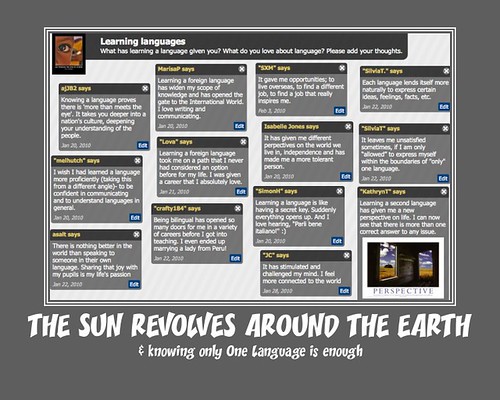
The central image in this poster is a screenshot of the wallwisher linked here, which asked the questions: "What has learning a language given you? What do you love about language?"

If you love languages please add to the wall by simply clicking in an empty space on it and expressing what languages have given you. You can even link to video, images or audio in your comment.

The text below the image seemed a good idea at the time but basically arose from the presumption that so many people still make (I still hear it at parent teacher interviews); that is, we don't need to learn another language as everyone else speaks English. I am fairly sure that I am not alone in my opinion that this belief is not quite on the mark, kind of like the views of those who dismissed Galileo's views back in the 17th Century.

Learning Languages


Tuesday, 11 May 2010

Hiragana Play Dough

I've been meaning to buy some play dough for quite a while now, the kind we used to use in kindergarten - or more recently if you have children of your own. Play dough for creating whatever you imagine or, in our case, for helping to remember the Japanese hiragana script.

The class loved it, though its not an activity you would try too often. It was noisy but the students were thinking about the shape of each character and its associated sound. The results, thanks to the departments flip video camera, are below.

Saturday, 3 April 2010

Language Learning: tips & tricks

Teaching our students how to learn is of course as important, if not more important, than what they learn. Learning a language is a new experience for many of our Year 7 students, and for those who have not learnt a language before, they may never have been shown how to do it.

Next time you set
"learn the ... vocab on p... of the text" as part of your students' homework, give them a few tips on how they can do that, assuming you haven't already. Let them know that we all learn in different ways and the way one student learns their vocab will not necessarily be the way that everyone else does. We need to help each student find the most effective way for them to learn. At school I learnt my vocabulary by writing it down again and again (and again), now I learn through flashcards and by trying to use the vocabulary as often as possible. Both methods work in their own way but I now prefer flashcards and flash games.

Here's my attempt at putting some tips for language learning into one place. If you have any tips for me to improve the presentation, please let me know via a comment.


Thursday, 1 April 2010

Music and Japanese Lyrics

A while back I wrote here about using music to inspire your Japanese language learning. In class this week my students pointed me towards 'jpopasia', a place to watch music videos and communicate with like minded fans of Japanese and Korean Pop music. The added benefit of this site, from my angle, is that many of the videos have the lyrics (including kanji lyrics) alongside them. This means we can listen to as well as read the Japanese. As mentioned in the post linked above, I learnt a lot of kanji and vocabulary from too much karaoke and now I see many of my students doing the same; as well as learning Japanese through manga and anime. The difference now is accessibility - Japan and Japanese music is so much closer. As the site's authors put it:

All we want is to promote Japanese music outside Japan. It's really hard to find and discover new Japanese music because of the language barrier and availability. We think we can fill this missing link in providing romaji titles and promotional videos.

So, find a song your students like, look at the grammar and kanji in the lyrics and use these to help reinforce the structures and script being learnt in class. In class yesterday, Angela Aki's song Tegami and lyrics helped us to revise a whole heap of kanji and to look at the grammar structures 〜ないで、〜そう(な)and 〜(え)ば. I even learnt a couple of new kanji myself.

Posted via web from Js Nihongo